Creating Basic Joins for your Queries
Setting up the FROM line of your Query
Purpose of JOINs
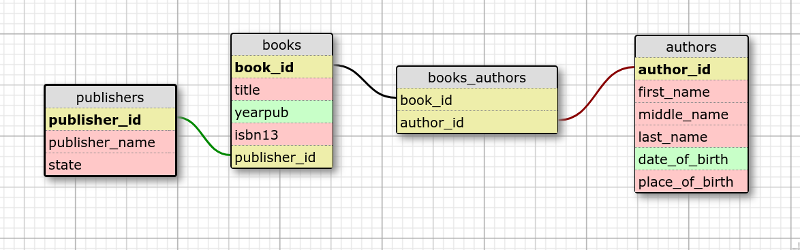
So, JOINs can be a bit confusing when you are first learning how to create the "FROM" line in SQL queries. Before you can really understand joins, it helps to understand the relationships between tables, usually created by a Foreign KEY (FK field in one table) linking to a Primary KEY (PK field in a different table).
To avoid duplication/etc, information about any one chunk of information can be split amongst many tables. So, in the example ERD (entity relationship diagram, schema design etc) above, the books table contains the book information only, but it does have a foreign key "publisher_id" that has the id number of a specific publisher.
The publishers table has only the publisher information, and its primary key "publisher_id" is what the foreign key "publisher_id" in the books table references.
Author information is kept in the authors table, so looking at just the books table tells you NOTHING about who the authors are for that book.
Because you can have more than one author per book, and authors can have more than one book, we create a table to connect those two tables together called "books_authors" which contains sets of unique combinations of book_id and author_id.
This is sometimes called a "JOIN" table, which can be confusing when doing the JOINs in a query, but they are kind of related.
If a book, say, "Mad Scientist Stories" with a book_id of 15 has 23 authors, book_id 15 will show up 23 times in the books_authors table, but each time it does, it will be matched up with a DIFFERENT author_id, once for each unique author_id:
15,2
15,34
15,255
15,13
15,15
and so on for 23 times
If an author has 10 books that they have authored, their author id (we'll say author 34 is Stan Lee), then author_id 34 shows up 10 times in books_authors, once for each different book(book_id). Notice above, apparently Stan Lee is one of the authors for "Mad Scientist Stories" in this example.
But, as we set a combined unique key on (book_id,author_id) a particular combination of author and book can only show up once. (so we will only see 15,34 once, even though book 15 shows up 23 times, and author 34 shows up ten times).
NOW, to set up JOINS (aka INNER JOINS) for your QUERY, you have to specify to the Query Optimizer (built into MySQL) how the data in one table matches up to another table. This USUALLY is just the PK to FK relationship mirrored via JOINs.
Types of Relationships and Joins
- 1 to Many relationship (1 → ∞)
- Most Common
- Usually refers to a UNIQUE Primary Key (the 1 as there are no duplicates)
- And a Foreign Key that links/refers to that Primary Key (Many as you can have duplicates)
- Many to Many (does not really exist)
- Another word for a connection or join table
- has 2 different 1 → ∞ relationships pointing to it
- so because it has two ends with the "Many" (ie the Foreign Key), it is often misnamed many to many
- 'odd' table relationships (1 to 1 etc)- Class Notes
- Types of JOINS (INNER, LEFT, RIGHT, FULL) - Class Notes
How to build your Query
Parts of a SELECT query
SELECTfollowed by the list of fields you want to displayFROMoften the hardest part to set up at first, lists the tables and how they are joined. NOTE: This part is usually created first, which seems oddWHEREthis is where your filtering conditions come into playGROUP BYused for aggregate queries (where you combine related data) using functions likecount(),sum(), andavg()in theSELECTlineORDER BYfor sorting- Many other options.
Getting Started
- Know what information/questions you want to answer.
- You need to know what fields you need to retrieve to get the results/answer you want.
- Using that information and your ERD figure out what tables you will need in your query.
- Use that to build your "FROM" line
What Tables to Use
- Some possible questions we want to ask of our database, which determines which tables are needed.
- what are all the publisher names? (would only need the publishers table for this)
- what are all the author names? (would only need the authors table for this)
- Can you give me a list of all the book titles, isbn and years published (only need books for this query)
- A list of all the books and publishers? (books and publishers)
- A list of books and authors (need books, authors AND the table that connects them, books_authors)
- A list of books, authors and publishers (need all 4 tables)
First Table
Once you know which tables you have to use, you need to tell MySQL what tables to use, and how the information in the different tables matches up (ie how to link or join the tables together). If you only need one table, the from line is very easy
    FROM authors

    /* or */

    FROM books

    /* or */

    FROM publishers
But is there is more than one table, you have to tell the system how the other tables are connected. If not, the database will basically give you every possible combination, which is useless (basically every author is on every book and every publisher is for every book and so on :P)
So, we'll pick "A list of books and authors" which needs books, authors, and books_authors to get the info we need.
For general queries, it isn't always that crucial which table to list first, but I usually pick a edge table in the design and work my way through. As this database is about books, I'll pick that one first.
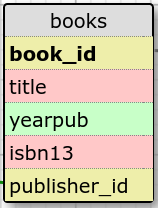
Again, the very first table is easy, you just name it, and possibly create an alias for it ("b" in this case)
    FROM books  b

    /*
    so, search the books table, and we temporarily name it "b"  for convenience
    */
Adding Tables
Now, we need to add in the next table, and again, the order doesn't always matter.
HOWEVER, any table that you are JOINing to the FROM line HAS to connect to one of the tables that you have already put in the FROM line
As books_authors is the only one that connects to books
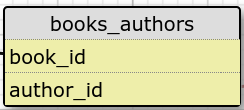
If we just listed the next table without telling SQL how they match up, we'd have a disaster like so
    FROM books b, books_authors ba

    /*
    WRONG, it matches every line in books with every line in books_authors
    */
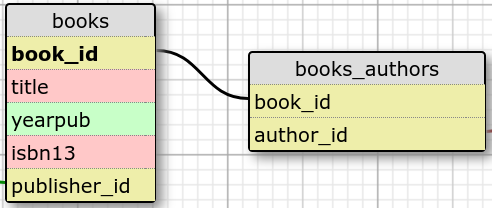
So, instead, every table we add AFTER the first table listed, we have to JOIN it, and tell it ON what fields to check for matches. As the only possible connection between books and books_authors is "book_id" we do
FROM books b JOIN books_authors ba ON (b.book_id = ba.book_id)
This says only show me results where the book_id in the books table (b) matches up to a book_id in the books_authors table (ba).
This effectively has told your query to do this:
If we decide to add the publishers table, we can just do
JOIN publishers p ON (p.publisher_id = b.publisher_id)
But that table is not needed to answer our question, so we will add in the authors table next, which if you look at our design makes visual sense, but again, usually the order of tables isn't that crucial
    FROM books b JOIN books_authors ba ON (b.book_id = ba.book_id)
    JOIN authors a ON (ba.author_id = a.author_id)
Which represents:
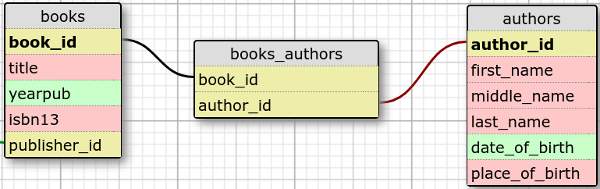
So, at this point, we have listed the three tables, and we have set up the connections (JOINS) between all three.
Now if we do a query, we only see a result if ALL of those JOIN conditions are met.
If there is a book without a value in books_authors, it doesn't show up at all, same for authors.
All Tables Included
Even though our question does not need publishers, say we later want to know the publisher for each book as well as all the authors:
    FROM books b JOIN books_authors ba ON (b.book_id = ba.book_id)
    JOIN authors a ON (ba.author_id = a.author_id)
    JOIN publishers p  ON (b.publisher_id = p.publisher_id)
And of course, this represents:
Building the Rest of your SELECT query
- After you have the FROM line set up, you can decide which fields from which tables to display
- And you can use the alias set up in FROM instead of the full table name
- title (from the books table, aliased to b so b.title instead of books.title)
- yearpub from books so b.yearpub
- isbn13 from books so b.isbn13
- first_name from authors so a.first_name
- last_name from authors so a.last_name
- Now that you know what fields you want, place them in the SELECT in the order you want to see them
-
You can also use functions
count() sum() concat()with those fields, but we will cover that later.SELECT b.title, b.yearpub, b.isbn13, a.first_name, a.last_name FROM books b JOIN books_authors ba ON (b.book_id = ba.book_id) JOIN authors a ON (ba.author_id = a.author_id); /* Gives us the information on ALL books as there is no WHERE clause. As there is no information we want to retrieve from books_authors in this example it is NOT listed in the SELECT line but it MUST be in the FROM line so SQL can match up books to authors. */
-
If you wanted to add publisher information you need to edit the FROM and the SELECT
SELECT b.title, b.yearpub, b.isbn13,p.publisher_name,p.state,a.first_name, a.last_name
FROM books b JOIN books_authors ba ON (b.book_id = ba.book_id)
JOIN authors a ON (ba.author_id = a.author_id)
JOIN publishers p ON (b.publisher_id = p.publisher_id);
-
Finally, we can add in a
WHEREclause, to only show us books published in 2013SELECT b.title, b.yearpub, b.isbn13,p.publisher_name,p.state,a.first_name, a.last_name FROM books b JOIN books_authors ba ON (b.book_id = ba.book_id) JOIN authors a ON (ba.author_id = a.author_id) JOIN publishers p ON (b.publisher_id = p.publisher_id) WHERE b.yearpub = 2013;


